I'm an idiot. A huge idiot. Remember how I reported about rolling out 2 Draytek Vigor 2800G routers? Turns out I ordered the wrong routers. A 400 euro mistake.
The routers I ordered come with a built-in modem, and all snazzy features that the router has, are done on the WAN interface(The modem). But, Versatel doesn't allow their customers to replace the modem with one of their own and the new line that was in the new office was an SDSL line. So none of the routers can be used.
I'm trying to order the Vigor 2910 now, which is used to cable(And therefor, has a WAN interface where an RJ-45 plug fits in). I'll contact a reseller to see if it works on the SDSL line and Versatel, and if so, see if I can get a hold of them today and roll them on tomorrow(Which was supposed to be a day off)...
Idiot...
Wednesday, May 16, 2007

Monday, May 14, 2007
Problem solved, and the lack of updates
I'll kick off with some good news: I solved the issues with the weird rendering of vertices. I got the advice to toggle some of the important and basic D3D feats off/on to make sure it all didn't get messed up.
I decided to walk the list of D3D renderstates and pick the ones I knew and change them to be off. This was lightning, Z-Buffer, CullMode and FillMode. Turns out, the z-buffer was the problem. So now i know where the problem lies, I can continue to work on the issues at hand.
However, there is a reason for the lack of updates: I'm very busy at the moment with school and my business. For school we have program a robot, and most of the hardware of the bot was dead. So we got new hardware, and need to update all the code to work with the new hardware, re-write all the PIC controllers(They burned out, and no source was avaliable) and implement new features too. And I got a few clients that demand my attention aswell.
Tomorrow I will be delivering 2 Draytek Vigor 2800G to a client. And these things are pretty sweet. They support up to 32 simultaneous VPN connections, protocol blocking, content filtering, url filtering and they're wireless too. It's pointless for home usage(As they're 200 euros a piece), but for a business, it's pretty sweet stuff.
Saturday, May 05, 2007
Some minor issues...
I'm currently having weird issues rendering linestrips... I noticed this week that the drag selection wasn't rendering anymore, so I went to search what the cause of this was.
I still have no idea what causes it, but the more I test, the stranger the results: After a a reboot or running another DX application, it now shows a filled triangle(As it should), which it is striped. However, when I move my self-rendered cursor over it, it disappears.
Restarting the application doesn't work, it just doesn't show up. Pretty weird... I asked on GDNet, hoping they can help me out....
Monday, April 23, 2007
Almost a game...
Today I merged the UI code with the Gamestate code. And lo and behold: Something that looks like a game.
 Almost a game, almost.
I discovered there is something severely messed up(I nearly wrote fucked up) with my Post-Build step. It doesn't update the revision in the bottom of the screen properly. It probably has to do with TortoiseSVN and it not going a proper update after the commit. Because if I do an update after the commit and recreate the file, it works like a charm. Pretty weird.
Also, I'm thinking about how I am going to handle building of stuff. First of all, I need something that manages buildings. We shall call this the BuildingManager. The BuildingManager contains a list of all buildings in possession of the player. When a building is destroyed, it will remove it, etc. Also, I need something to uniquely ID the buildings across the network(Yes, I'm also thinking about). So, each building will have an unique identifier, which is nothing more but a sequential integer.
When a building is being constructed, the BuildingManager will receive it's application and store it. It will then return the unique identifier to the building and inform the network about a newly constructed building. When it is the first building of it's kind, it will also contact the ConstructionManager. The construction manager will look in TechTree and see if there are any changes needed. If for instance the building just placed is a construction yard, it will see that after a construction yard has been built, the slab and windtrap will be unlocked. It will then add these to the construction sidebar.
For a networked game, there will be a RemoteBuildingManager(RBM) and a RemoteConstructionManager(RCM). The RCM will not schedule any construction, it will only pass the order to the correct building. The LocalConstructionManager(LCM) however, will find an idle building and post the build order there to be completed. This has the added pro of the game being able to check if a player is using hacks(Because, it can see how long it takes before the next build order arrives. If the remote player has an instant build hack, it can see that the player still has to wait for the construction to be completed).
So, still a lot of work to do, and I'll start out with the techtree loader tomorrow.
Wednesday, April 18, 2007
Hello Arrakis!!
I added some more features to the Windowing system, and I think I'm done for now with the system. All that remains are the controls to be written, and I'll write those as soon as I need them.
Features I've added:
- Complete rendering of the borders and title bar
- Client rectangles(Client Rectangle = Window - borders)
- Dragging of windows
- Move event for when the window is being dragged around
The dragging of the window was quite some work, as I needed to change quite a lot of code. It wasn't very difficult, just required a lot of code changing, since I never wrote the code to be able to drag the windows around, nor intend to have borders around it them(Pretty stupid).
This initially ended up with the Control class drawing itself on the wrong position while being dragged, and the derived class draw on the correct position. Pretty weird, and I still have no idea why this happened. The image below shows this in action(I had to place my fingers in a really uncomfortable position to be able to get this pic. My left hand pink and ring finger held down the FN + ALT key, while my thumb help down the L-mouse on my touchpad, my index finger drew circles on the touchpad and my right hand was used to pressed Print Screen).
 Dragging bug in action, nearly lost my fingers while obtaining this image
After I fixed the dragging bug, I'd figured I'd make a standard dialog window(Not yet written, but the code needed for it is ready, just need to be moved into another class). This is what it looks like:
 Standard dialog with label and button
How does the dragging system work?
When the L mouse down event is catched, it checks if the mouse is over a window. If this is true, it will check if the mouse is within the ClientRectangle. If this isn't the case, it checks if the Y is within the bounds of the TitleBar. If this is true, it will record the state as Dragging for the LMouse button, and which control it is dragging.
On every mousemove, it checks if the LMouse is down, and when this is the case AND the state is dragging, it takes the Delta X and Y and substracts this from the position of the window. It then forces to update all the client rectangles and voila, done.
New control
I added a Label control. Not very special, it took like 2 minutes to create...
Todo for now:
- Create a MessageBox class.
- Add support for modal windows
- Incorporate UI into existing game class.
- Build CreditCounter control(Dune specific)
- Layout new todo list for building, techtree, etc.
Also, to answer a previously asked question about open-sourceness:
For now, I will keep the source closed. This is a personal project, and I don't take kindly to people changing my code while I'm still working on the game. However, after the game is completed, I might open-source it. However, I might, might release my UI system, in case people want to take a look at it, and perhaps improve it. It's not the best system out there, there are MUCH better UI systems out there, but it works for a small amount of controls.
Sunday, April 15, 2007
Image strips are in... And update on dialogs
Today I managed to add the images into the imagestrip. The image strip is the little strip that holds all the icons of the units/buildings you can make, and allows you to scroll through it.
It was rather simple to implement, except I ran into 2 little problems: The original images that were used in the original Dune for the imagestrip end up HUUUUGE when enlarged. So I scaled them up 2 and then reduced them to 66% of their size. That worked quite well(As you will see below).
After that it was a matter of painting the green bar between the 2 images and fit a few images in. Fitting the images in wasn't very difficult, except that was were the other problem was: The icons Stefan provided with his Dune 2 image set were too small. Increasing them in size turned out horrible. Really horrible. Loads of artifacts and they were pretty pixelated.
So I had to find a way to extract the images myself. This was rather problematic, as I had no idea which of the PAK files contained these images, and only 1 PAK file contained the palette files. I downloaded XCC Utilities and started messing around, but I was unable to load a palette after loading a new PAK file.
Eventually I extract the palette file, made copies of the MENTAT.PAK and FINALE.PAK. I then opened up XCC editor and placed the palette file into both these files and saved them. I then loaded up FINALE.PAK and MENTAT.PAK into XCC mixer and discovered that mentat had all the images, but that finale.pak also had a bunch. Duplicates that is, since all these images were also in mentat.pak. I have no idea why there were 15(!!) duplicates in the FINALE.PAK. These images(All just 1 frame) were the sardaukar, death hand, fremen, refinery, MCV, sand worm and a few others. When I looked in mentat.pak, I fould all the images, with their animations.
I extracted these files, and converted them into icons. The icons are 52x32 in size. If anyone wants these, for whatever reason, let me know, and I'll upload them. I also have to extract a few other files from the dune.pak file, since these are missing(I think I'm missing 1 missile impact animation and the burning/burned out tank).
Right now I need to update the image strip so that clicking is supported, it's possible to mask out all the images except 1(The building animation, not sure how I'm going to do that with multiple construction queues) and I need to fix the windows and their title-bar/border drawing.
 The UI in action, showing the image strip(Scrolling works) and a window with title bar
I also need find a better way to render client areas of Windows. Right now they are textures. That's a a massive waste of VRAM, so I need to fix that. I'm probably going to use quads for the client area and just cram them into a VertexBuffer and render all the client areas at once. Not sure how that will work out, but I'll experiment with it. Alternatively, I could just create 1x1 textures with the correct background color, and rendered them stretched. Don't know which one is less work and/or cheaper to do in terms of performance.
Thursday, April 12, 2007
More gooey goodness...
Ok, f this. I just spent 30 minutes writing up an entry about my awesome progress with in-depth details of decisions, backgrouns and other information, and then Firefox decided to crash.
When I restarted it, it recovered the session, but the entire post was gone. And apparantly, clicking 'Recover post' does nothing, except show up a messagebox that it will replace the post with an older version. WHAT OLDER VERSION?
Here's an image of the UI in action: A button with the mouse over it and the left mouse button down. Hooray, BOOOOORING! And yes, I'm annoyed now. Really annoyed. Annoyed as in I want to break something. And yes, I have anger management issues. It's a miracle I never killed someone.
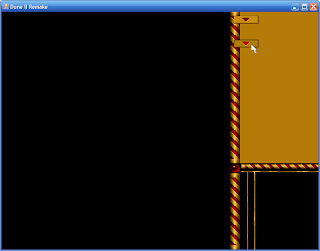 A really not very exciting image with a button responding to a mouse down event. Tee hee
When I restarted it, it recovered the session, but the entire post was gone. And apparantly, clicking 'Recover post' does nothing, except show up a messagebox that it will replace the post with an older version. WHAT OLDER VERSION?
Here's an image of the UI in action: A button with the mouse over it and the left mouse button down. Hooray, BOOOOORING! And yes, I'm annoyed now. Really annoyed. Annoyed as in I want to break something. And yes, I have anger management issues. It's a miracle I never killed someone.
 A really not very exciting image with a button responding to a mouse down event. Tee hee
Wednesday, April 11, 2007
It's my birthday...
So yeah, I turned 24 today. Nothing special, just a funny cat. Also, I have no time to code today.


Monday, April 09, 2007
Still working on the UI....
Yes, I am working on the UI stuff. I got the events sorted out, and I'm right now working on rendering the system controls and the window bar. Nothing special to see right now.
To keep you guys happy, here's a cat. DuneCat

To keep you guys happy, here's a cat. DuneCat

Saturday, April 07, 2007
User Interfaces are GO!
So, yesterday I started working on the user interface code. I thought it over a bit, and came to the conclusion I would go with the "Everything is a window" approach. The reason for this was so that I could make the WindowManager class a Task, shove it into my engine, and forget about it.
However, it made me think later on: What if you're playing an FPS, and everything is a window? Then there might be a chance that you have your comm. window open while laying an ambush. You suddenly see an enemy walk around the corner. He hasn't seen you yet, so you jump up, aim at his head and hit left mouse. But instead of shooting him the head, you'll order a pizza from the comm. window, and end up dead yourself. Oops, comm. window stole the cursor focus.
So, before I managed to mess everything up, I changed it all to be "not-everything-is-a-window", and non-task. Basically, I have to keep track of the WindowManager now, and during each update cycle check if the mouse is over a window, and then ignore the input in the regular game handler. When it's not over a window, I do my normal mouse logic. In the case of the FPS, it would mean I have to press a special button before I'm able to interact with the UI.
Right now, basics are in, that is: I have the WindowManager, basic flat-style windows and response from the windows from the mouse. As seen in this exciting image(I merged to images together, because having 2 huge black images with 4 colored squares is boring).

Basically, I clicked on the blue window, and it came Top-Most. Exciting huh? Indeed, it's not...
Before I started to work on the gooey system, I also updated my mouse input code a bit. It no longer uses DirectInput but regular Mouse Events. This has the added advantage of that I have the mouse acceleration that Windows provides for me(Before, the Windows mouse would move faster than the in-game mouse. That's now fixed.). Also, the Windows mouse cursor is now hidden. I have no idea what kept me from doing Cursor.Hide() in the first place...
Tomorrow and monday it is easter(Yes, we have 2 easter days), so I doubt I'll manage to do any work on the gooey system. But, I'm currently writing the mouse-event cascading system. Meaning: When the mouse is over a certain window, this window will check for any updates(movement, etc.) and trigger the events, and then see if any of it's children need to know about the mouse update. I started out with this code to be in the WindowManager, but that ended up being a horrible mess. So I now leave this to the base Control class.
Thursday, April 05, 2007
IT'S A TRAP!
I finished coding up the windtraps.

The technique behind this is pretty easy. What I do is create a static texture for all windtraps in white. During rendering, I first render the white texture with an overlay color, and on top of that, I render the normal windtrap texture. And in the Update() function of the windtrap, I have a timer to increase/decrease the color every 1/10th of a second. Simple, and effective.
I will probably add this texture to the SpriteSheet, as it would reduce texture swapping. And texture swapping is bad, m'kay?
I also added a link to the development blog of an online friend of mine. He's developing a 3D engine and a bunch of games with it. Except it takes him a decade to produce it all. Yes, I'm serious. A decade.
Tuesday, April 03, 2007
Building basics are done
I got the basics of the buildings in! And by basics I mean the image files, the classes(Each building has it's own class, as oppossed to units which mostly consists of 1 class and a few derived for special units).
 Buildings in action
The reasons are simple: Most buildings have a bunch of animations which are non-standard(starport, refinery, radar), buildings also add 'things' to the game. For instance, building a light factory, enables you to construct new units. By spawning the building, it 'registers' itself with the game, exposing the features to the rest.
All the buildings also play their 'pre-deployment' sequence. This is a different sprite(See below), which is displayed when the building is deployed. It then 'blinks' between the normal and the deploy image a few times with decreasing interval and finally shows up normally. Nothing fancy, nothing difficult to make. However, I must say, I'm getting a quite a lot of timers... Thank god timers don't have a 68MB memory footprint(A la the clock in Vista).
 Buildings before being fully deployement
I'm not sure how I'm going to proceed from now on. Probably the next thing to do is to get the powerplant operational, showing it's animation. EDIT: In before someone comments about it: Yes, the 3x3 and 3x2 buildings are off half a tile. This is because they render using their position, not by tile. since I used 64 as X position, it renders from 64 - (32 * 1.5) = 16. Would I use X - 80, they'd render normally.
However, this probably does bring up the problem I had before: Images are alphablended into 1 fugly soup of weird colors. I really should spend some time testing out with the various D3DXSprite render modes to figure out how to only replace specific colors. If the power plant works, I'm going to make buildings selectable, including a selection marker.
After that, I will probably start working on the UI parts. I'm not really looking forward to that, but after that, it will start piecing together.
Stefan: On a sidenote to what you said about rotating the turret and moving: Good point. I'll fix that aswell.
In other random news: I got a new archwire for my braces. I went for 012 to an 016. I know it means the thickness of the wire, but not really sure how. I'd assume it's 0.12cm, but not sure. Anyway, my teeth are sore now. But I know what I'm doing it for: sexy teef!
And, changed the layout of the blog a bit. I upgraded to the new layouts, which allow me to expand the layout myself. I'm probably going to add a ToDo list to the left navigation bar. Should be hot.
 Buildings in action
The reasons are simple: Most buildings have a bunch of animations which are non-standard(starport, refinery, radar), buildings also add 'things' to the game. For instance, building a light factory, enables you to construct new units. By spawning the building, it 'registers' itself with the game, exposing the features to the rest.
All the buildings also play their 'pre-deployment' sequence. This is a different sprite(See below), which is displayed when the building is deployed. It then 'blinks' between the normal and the deploy image a few times with decreasing interval and finally shows up normally. Nothing fancy, nothing difficult to make. However, I must say, I'm getting a quite a lot of timers... Thank god timers don't have a 68MB memory footprint(A la the clock in Vista).
 Buildings before being fully deployement
However, this probably does bring up the problem I had before: Images are alphablended into 1 fugly soup of weird colors. I really should spend some time testing out with the various D3DXSprite render modes to figure out how to only replace specific colors. If the power plant works, I'm going to make buildings selectable, including a selection marker.
After that, I will probably start working on the UI parts. I'm not really looking forward to that, but after that, it will start piecing together.
Stefan: On a sidenote to what you said about rotating the turret and moving: Good point. I'll fix that aswell.
In other random news: I got a new archwire for my braces. I went for 012 to an 016. I know it means the thickness of the wire, but not really sure how. I'd assume it's 0.12cm, but not sure. Anyway, my teeth are sore now. But I know what I'm doing it for: sexy teef!
And, changed the layout of the blog a bit. I upgraded to the new layouts, which allow me to expand the layout myself. I'm probably going to add a ToDo list to the left navigation bar. Should be hot.
Monday, April 02, 2007
Little weapon update!
I fixed a few things in the weapons. I made rockets leave smoke trails. It does look good, when you fire a single rocket. With 2 rockets, it looks a whole lot less pretty. Probably has to do with the fire rate of 0.5 and the trail spawning with the same rate. Here's how it looks:

Looking good. I did have a few bugs with it, which was good in the end, since I had a nasty little parse bug with the rules.ini. Apparantly, float.Parse() looks at the Locale settings for numbers, and on my Dutch settings, it excepts to see a ',' as decimal point, instead of a '.'. Therefor, it parsed my 0.5 to 5. I fixed that with with a NumberFormatInfo instance, setting the correct char and passing it to every float.Parse() call. Nothing serious.

Oh, this was a little timing info bug. I had the smoke trails randomly pick a number between 0.0 and 0.5 for releasing their puffs, but forgot to set it back to 0.5 after the initial puff(I wanted a gap of 0.5 between puffs, and a random first puff, so they're not all on the same spot).

This is the final result, including a demonstration of the enemy quad being on firing(Including debug output. I should remove these, otherwise I end up with a cluttered debug log, which I don't really want.
Now I'm going to add Buildings to the game, and after that, the User Interface :D.
Speaking of which... I have basically a week off... Not something I'm very happy with, because I'm missing 5 exams now. But my stupid college requires that I sign in for every course I follow(I'm automatically enrolled to the course, but I have to enroll for the exams). Since I forgot to enroll myself for the exams, I'm not allowed to make them. Kinda weird. You're enrolled for the course, but not for the exam by default. I'm pretty pissed off...
Saturday, March 31, 2007
Weapons are done!
I finished off the weapons. Well, most parts. There are a few minor things that I need to change. But most of the work is completed.
First of all: I changed how units keep track of their internal state. Initially, I had a unitState attribute in each unit class. Which worked reasonable, until I started adding attacking. I had to define several states, such as AttackGroundRotate, AttackGroundMove, AttackRotate, AttackMove, AttackGround and Attack. Yes, that's overkill...
What I did was implement the unit states as a stack. I then cut down the states to their basics: Move, Rotate, RotateTurret, Attack and AttackGround(There are a few more, but I'll safe you the hassle for those). When a unit is sitting idle, it's state contains just 1 state: Guarding. When moving the unit, it's a matter of pushing a bunch of states onto the stack and the unit manages after that. For moving, I just push Move and Rotate onto the stack. In the rotate state, it will determine the desired angle, rotate to it and pop the state. The next time the unit updates, it starts moving.
I also did the same with the gun, except I did make a different state for it, since some units have a seperate turret sprite. This will rotate the unit normally for units without a turret, and rotate the actual turret for those units who have one.
With the stack I also implement a CancelOrders function, which allows you to cancel whatever your unit is doing. However, it has a tiny bug(which I noticed after comitting my code, so I'll fix that after publishing this post): When moving, it stops the unit directly. The unit doesn't stop in the middle of a tile as it should.
The code for checking distance to the target, determining if the weapon is ready, etc. is very exciting to tell about. Only exciting thing I can think of is are the images below.
Only things left to do with weapons: Have the ornithopter fly attack patterns(Since it can't hover), have rockets leave smoke trails(Not in the original Dune 2 I believe) and have units spray smoke when their HP is below 50%.
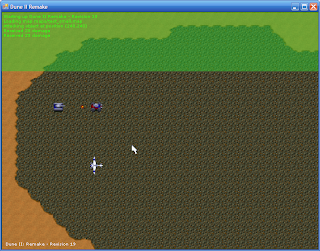 Medium Tank just fired it's weapon at the quad, which is doing nothing...
For those who are wondering why there isn't a healthbar showing in the first pic: I removed them, since I need to redo how healthbars work. The old way sucked donkey balls. Also, there is no image of the quad exploding, since I tried 4 times and still couldn't get to show the explosion.
First of all: I changed how units keep track of their internal state. Initially, I had a unitState attribute in each unit class. Which worked reasonable, until I started adding attacking. I had to define several states, such as AttackGroundRotate, AttackGroundMove, AttackRotate, AttackMove, AttackGround and Attack. Yes, that's overkill...
What I did was implement the unit states as a stack. I then cut down the states to their basics: Move, Rotate, RotateTurret, Attack and AttackGround(There are a few more, but I'll safe you the hassle for those). When a unit is sitting idle, it's state contains just 1 state: Guarding. When moving the unit, it's a matter of pushing a bunch of states onto the stack and the unit manages after that. For moving, I just push Move and Rotate onto the stack. In the rotate state, it will determine the desired angle, rotate to it and pop the state. The next time the unit updates, it starts moving.
I also did the same with the gun, except I did make a different state for it, since some units have a seperate turret sprite. This will rotate the unit normally for units without a turret, and rotate the actual turret for those units who have one.
With the stack I also implement a CancelOrders function, which allows you to cancel whatever your unit is doing. However, it has a tiny bug(which I noticed after comitting my code, so I'll fix that after publishing this post): When moving, it stops the unit directly. The unit doesn't stop in the middle of a tile as it should.
The code for checking distance to the target, determining if the weapon is ready, etc. is very exciting to tell about. Only exciting thing I can think of is are the images below.
Only things left to do with weapons: Have the ornithopter fly attack patterns(Since it can't hover), have rockets leave smoke trails(Not in the original Dune 2 I believe) and have units spray smoke when their HP is below 50%.
As for now: Images! Medium Tank is being ordered to attack. Ornithopter is there for no reason
 Medium Tank is being ordered to attack. Ornithopter is there for no reason
 Medium Tank just fired it's weapon at the quad, which is doing nothing...
For those who are wondering why there isn't a healthbar showing in the first pic: I removed them, since I need to redo how healthbars work. The old way sucked donkey balls. Also, there is no image of the quad exploding, since I tried 4 times and still couldn't get to show the explosion.
Wednesday, March 28, 2007
Weapons are nearing completion
So, I got most of the weaponry in. I got a Weapon class to fire projectiles(Perhaps I have to add some more classes, such as a BulletWeapon and MissileWeapon, but not right now). The projectiles are in aswell, and this includes bullets and missiles(Which happen to be the only projectiles in the game). Also, the death hand missile is in, including 3x3 explosions.
I took a different way for missile weapons that the original. In the original there were 16 images of the missiles, where each image was rotated 22.5 degrees. Since the original had to run on 8 to 16 Mhz machines, rotating the images in real-time was probably impossible, so they just had a bunch of pre-made images. In assume they used a Cos/Sin lookup table during the game to calculate the trajectory of the missiles, since Cos/Sin calls are pretty expensive.
However, I wanted to save myself the hassle of having to calculate which of the images I had to use, so I cut up the images, took the 0 degree image, enlarged it and use that myself.
I did run into some serious trouble with the rotation tho. At first, I couldn't figure out how to rotate the 2D image without upsetting the entire world view. Turns out I forgot to restore the original Transform. Oops. And, I didn't quite understand that I needed to take the negative value of atan2() when the adjacent side of the triangle is below 0. Took me all day long to debug. But it works now.
As promised: The image. It shows randomly launched Death Hand missiles flying to their destination and explode. Oh, and a lone tank which I used to test the bullet and missile weapons on.

The next step is for weapons to have some intelligence: They have to determine if their target is in range, and if not, don't fire. After that, I can actually implement inflicting some damage based on armor stats. If that's all working, I can do some testing, and implement unit squashing. Oh, and corpses.
Monday, March 26, 2007
Rotation works... Finally...
Ok, so I finally managed to fix all the weird shit concerning rotation and movement. The large break from coding really helped on that.
Basically, what I did was this: I ditched all my previous movement and rotation code. I then re-build everything up from the ground using sheer logic. It was actually pretty easy.
I did make the same mistake I made the first time with my movement code. I rounded the location X and Y to an integer value(they're stored as floats). So, when a unit would move to x.86, it would round to x + 1, which obviously is somewhat correct. However, if I would start moving from this location, the angle wouldn't be correct anymore, and the unit would just move over a bunch of tiles it wasn't suppose to be on. I noticed this when I would start printing out the x,y locations after movement. Easily fixed.
After that, my rotation code was simple. The old code was overly complicated, while my current code(Including determination of which direction to turn in) is something like 20 lines.
Now I only need to re-work this code so that it also works for the turret, and the problem is solved. Then turretted buildings/units can share the same code.
So, later today I'll start adding weapons. I think I'll start out with the medium tank, since it's the coolest tank of all(coolest graphics, I have no idea why).
No images for now, perhaps after I got some weapons in.
Friday, March 23, 2007
Dual-Core ready!
I did some coding in the past days when riding the train. However, when I moved my code from my desktop to my laptop(which has an AMD x2 in it), I noticed movement had crawled to a slow.
I tried to fix the problems with setting ProcessAffinity, ThreadAffinity and whatnot, which all failed horribly. Eventually Mithrandir pointed out that DateTime.Now has a Ticks property, which holds the number of 100 nanosecond thinks since 1 jan 0001. I re-write my FpsCounter class to use that, and since then, it worked like a charm again.
So, if I recall correct, I was working on the unit rotation code, so I'm back to checking out the status of it, and probably re-write it completely. I remember it was flaky last time I was working on it. After that, I'll add some weapons.
On other news: These Tower-Defense games are all hawt all the sudden. Perhaps I'll write a little one myself using the current dune 2 remake engine. Shouldn't take too long once the building construction stuff is in.
Wednesday, March 21, 2007
Update!
I read some comments from people who wanted an update on the game and/or progress. So I figured, I'll do that now.
First on the game: I did some minor work on the game since the last update, but nothing major. The reason: I'm busy as hell with my own business and school. Especially school has the highest priority over anything else. Should be obvious why.
I intend to get the latest DirectX SDK on my laptop(Which I bought last december) and start doing some development for the game again. I need to fix the unit rotation a bit, since it's fucked up(The units sometime appear to wiggle, moving a pixel up and down while moving. Seems a bit odd, so I need to find out why.
After that, I intend to add weapons. Explosions are already in, so adding in the weaponry shouldn't be too much of a problem.
I want to spend some time today on coding, since I don't have an awful lot of to do(Except unpacking boxes. I moved again ;_;).
Saturday, November 11, 2006
omg, LARGE!

As you can see, the conversion to 32x32 tiles is completed for the existing build. The are a few issues with the enlarged tiles, which probably already were in the previous builds, but never showed up due to the small size of all the objects:
- Sometimes, when 2 units overlap each other partially, you'll see a strange alpha overlay. Not sure how to fix this, but I'm looking for a solution
- Some of the images didn't get through the enlargement process very good. For instance, the Ornithopter looks VERY good, while most of the infantry units are broken. They need to be fixed, but the problem with that is that I need someone good at pixel art to do that. And to be honest, I suck at pixel art.
- I decided to go with the standard D3DXSprite as it is. I currently load each image, replace the colors in the image, and then write the image to a texture. The biggest downside of this all is that it takes a lot longer to load all the data. I need to fix this.
- Re-write movement code
- Weapons in game
- Weaponry to rules.ini
- Handling of device lost
- UI components
After that, I'll add weapons and combat in. Lots of work to do.
Thursday, November 09, 2006
About Spritesheets, explosions, infantry and enlargement...
First of all, I have done quite some work in the past few days. I needed something to do, because I was low on workload. I decided to start coding again, and before I knew it, I was on a coding spree.
I finished the spritesheets, which had quite a few issues in the first attempt. Eventually I narrowed it down to being the code that was responsible for finding the proper location inside the sheet. I re-wrote it in a more manageable manner, and it worked. This is the result(The blue is used for debugging purposes, and will remain blue. This will automatically show the programmer what's going wrong.):
 Spritesheet in action, showing 1 subsheet
After I finished the spritesheet system, I decided I needed to do some front-end work, because I was bored with doing things without results shown in game. So, I ended up working on explosions. Yes, you read it correct: Explosions.
The system is quite simple: There's an Explosion class which houses the necessary functionality to run through the explosion sheets, do the timing and rendering. It's a GameObject, so you just shove it in the SceneManager and forget about it. When it's done, it informs the SM that it would like to be moved into the trash can for recycling. From the Explosion class, I derive a subset of explosion types: LightUnitExplosion, HeavyUnitExplosion, and the most interesting one: ExplodingBuilding.
Light/HeavyUnitExplosion refer to the number of steps and the used images. An exploding Light Unit(Quad/Trike) has 2 explosion steps, while a heavy unit has 5 steps. And there's only 1 image for an exploding light unit, and several for an exploding heavy unit. It picks the explosion in the constructor and then runs it. Now the interesting part:
The ExplodingBuilding was more tricky, because it needs to be dynamic in size, and look 'realistic'(As realistic as you can get with graphics from 1990, you get the idea). So, I started out by creating a BuildingExplosion class, which handles the explosion of 1 single building tile. It picks a random explosion from the list of explosion sprites for buildings and does it's thing. However, creating an M x N explosion in this way would look strange. All the explosions would start/end at the same time, and that would just look fake.
So, in the ExplodingBuilding, I build a list of each section(Say, 3x2, a refinery), place a random delay on it between 0.0 and 0.5 seconds and put an timer on it. When the timer expires, I stop it, spawn a random explosion at the section coordinates and start it. After all the delay timers are expired, the ExplodingBuilding removes itself from the SM. The BuildingExplosions then expire at some point and are removed aswell. The result(Including some failures):
 As you can see, random explosions for heavy units. The selection rectangle shows up because of the rigged mouse. More on that below.
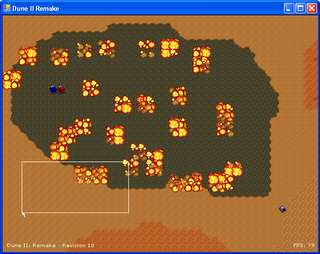 In the above image, I rigged the mouse to create random 4x4 ExplodingBuilding objects when clicked. I hacked it in, so when you'd drag the mouse, the selection rectangle wouldn't go away. Anyway, in this image the explosions REFUSED to go away, they kept going on forever. Turns out: Never ever use a .NET struct in a list. It will not retain variables you change.
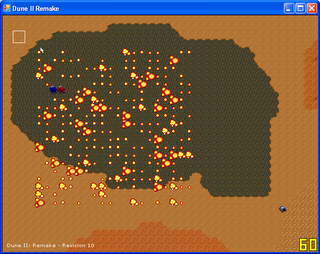 And the last screenie demonstrating the delay system: A huge 20x20 explosion to see it in action. In the bottom you see the FPS rate from FRAPS. Also, the shown revision is incorrect, it should be 14. There's a problem with my PostBuild step, so the revision number doesn't update.
After this I was on a spree and added Infantry units. Infantry units ARE a bit different than other units, since they have only 4 directions, and have moving legs. Most other units are reasonably static, except the carry-all which has 2 states(Tanks with turrets are 2 sprites, so they're still static). At first, I decided to go with the standard Unit class, which didn't cut it due to the movement and the Direction property. However, I discovered you cannot overload the C# Properties, so overloading this in the Infantry class doesn't work(Would have saved me the hassle of going through the pain of using a bigger texture and some work).
However, I noticed that Stefan had a 2nd sheet of infantry/trooper sprites. 8 directions, just repeated for the wind directions. So I used that and just had to overload the Update function in the Infantry class. 43 lines of code and an hour of work.
However, I discovered that the infantry was rather, erm, small. And with small, I mean, near invisible. They're 8x6 or something, so you have to look REALLY hard to see them. And Ravuya said the exact same thing: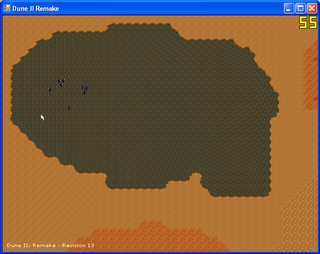 He then continued to link to me HQ2X. An application to enlarge images and still look smooth. Have a look at the examples, it looks really good. So I experimented a bit with that. The results are astounding:
 That's a Quad enlarged 2x. Looks very smooth. Only problem with HQ2X is that it can't work with palletized bitmaps, and converts them to 24-bit images, which is a problem.
I intend to let HQ2X loose on ALL the images for the game, and enlarge the entire game to 32x32 tiles instead of 16x16. However, I need a way to change the colors during runtime. I've been suggested to write my own Sprite replacement, which is what I did. It works, but only for single textures. I intend to add support for multi-texturing and use the Fixed Function pipeline to do some color changing for me. I'm still working on that, so I'm not sure how long it's going to take.
Until it works, I'm going to use the original images for everything and alternate it with doing some real work. Before I want to make the pass to enlarge everything, I want to have at least ALL the units in. This means I have to add the ornithopter, the frigate and the sandworm(Those are the ones still not done). Not a lot of work, but I need to make some changes in the code, and move all the aircraft specific code into a separate class to make full use of it.
That's the end of my long story for now.
I finished the spritesheets, which had quite a few issues in the first attempt. Eventually I narrowed it down to being the code that was responsible for finding the proper location inside the sheet. I re-wrote it in a more manageable manner, and it worked. This is the result(The blue is used for debugging purposes, and will remain blue. This will automatically show the programmer what's going wrong.):
 Spritesheet in action, showing 1 subsheet
The system is quite simple: There's an Explosion class which houses the necessary functionality to run through the explosion sheets, do the timing and rendering. It's a GameObject, so you just shove it in the SceneManager and forget about it. When it's done, it informs the SM that it would like to be moved into the trash can for recycling. From the Explosion class, I derive a subset of explosion types: LightUnitExplosion, HeavyUnitExplosion, and the most interesting one: ExplodingBuilding.
Light/HeavyUnitExplosion refer to the number of steps and the used images. An exploding Light Unit(Quad/Trike) has 2 explosion steps, while a heavy unit has 5 steps. And there's only 1 image for an exploding light unit, and several for an exploding heavy unit. It picks the explosion in the constructor and then runs it. Now the interesting part:
The ExplodingBuilding was more tricky, because it needs to be dynamic in size, and look 'realistic'(As realistic as you can get with graphics from 1990, you get the idea). So, I started out by creating a BuildingExplosion class, which handles the explosion of 1 single building tile. It picks a random explosion from the list of explosion sprites for buildings and does it's thing. However, creating an M x N explosion in this way would look strange. All the explosions would start/end at the same time, and that would just look fake.
So, in the ExplodingBuilding, I build a list of each section(Say, 3x2, a refinery), place a random delay on it between 0.0 and 0.5 seconds and put an timer on it. When the timer expires, I stop it, spawn a random explosion at the section coordinates and start it. After all the delay timers are expired, the ExplodingBuilding removes itself from the SM. The BuildingExplosions then expire at some point and are removed aswell. The result(Including some failures):
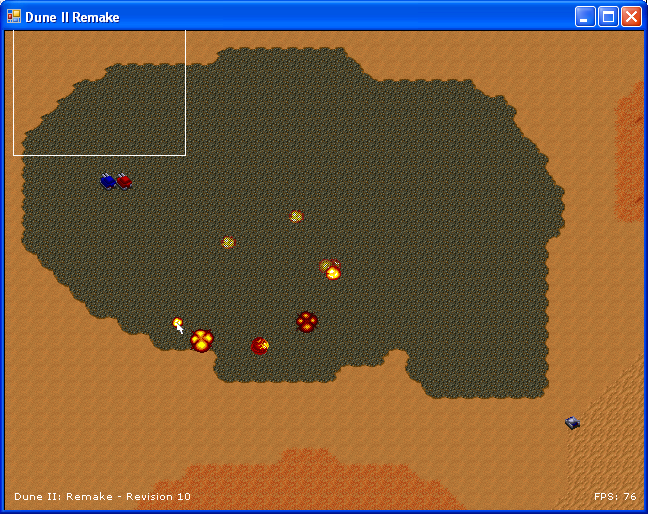 As you can see, random explosions for heavy units. The selection rectangle shows up because of the rigged mouse. More on that below.
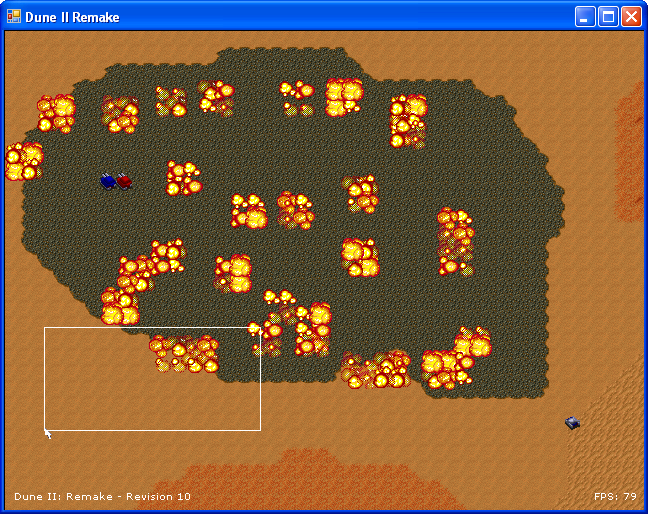 In the above image, I rigged the mouse to create random 4x4 ExplodingBuilding objects when clicked. I hacked it in, so when you'd drag the mouse, the selection rectangle wouldn't go away. Anyway, in this image the explosions REFUSED to go away, they kept going on forever. Turns out: Never ever use a .NET struct in a list. It will not retain variables you change.
 And the last screenie demonstrating the delay system: A huge 20x20 explosion to see it in action. In the bottom you see the FPS rate from FRAPS. Also, the shown revision is incorrect, it should be 14. There's a problem with my PostBuild step, so the revision number doesn't update.
After this I was on a spree and added Infantry units. Infantry units ARE a bit different than other units, since they have only 4 directions, and have moving legs. Most other units are reasonably static, except the carry-all which has 2 states(Tanks with turrets are 2 sprites, so they're still static). At first, I decided to go with the standard Unit class, which didn't cut it due to the movement and the Direction property. However, I discovered you cannot overload the C# Properties, so overloading this in the Infantry class doesn't work(Would have saved me the hassle of going through the pain of using a bigger texture and some work).
However, I noticed that Stefan had a 2nd sheet of infantry/trooper sprites. 8 directions, just repeated for the wind directions. So I used that and just had to overload the Update function in the Infantry class. 43 lines of code and an hour of work.
However, I discovered that the infantry was rather, erm, small. And with small, I mean, near invisible. They're 8x6 or something, so you have to look REALLY hard to see them. And Ravuya said the exact same thing:
 He then continued to link to me HQ2X. An application to enlarge images and still look smooth. Have a look at the examples, it looks really good. So I experimented a bit with that. The results are astounding:
 That's a Quad enlarged 2x. Looks very smooth. Only problem with HQ2X is that it can't work with palletized bitmaps, and converts them to 24-bit images, which is a problem.
I intend to let HQ2X loose on ALL the images for the game, and enlarge the entire game to 32x32 tiles instead of 16x16. However, I need a way to change the colors during runtime. I've been suggested to write my own Sprite replacement, which is what I did. It works, but only for single textures. I intend to add support for multi-texturing and use the Fixed Function pipeline to do some color changing for me. I'm still working on that, so I'm not sure how long it's going to take.
Until it works, I'm going to use the original images for everything and alternate it with doing some real work. Before I want to make the pass to enlarge everything, I want to have at least ALL the units in. This means I have to add the ornithopter, the frigate and the sandworm(Those are the ones still not done). Not a lot of work, but I need to make some changes in the code, and move all the aircraft specific code into a separate class to make full use of it.
That's the end of my long story for now.
Subscribe to:
Posts (Atom)